
AI
How to Keep the Same Character in AI Videos: The 2026 Consistency Workflow
A practical reference-first workflow for keeping faces, outfits, style and identity stable across AI-generated video scenes.
· 8 min · Hangar Works
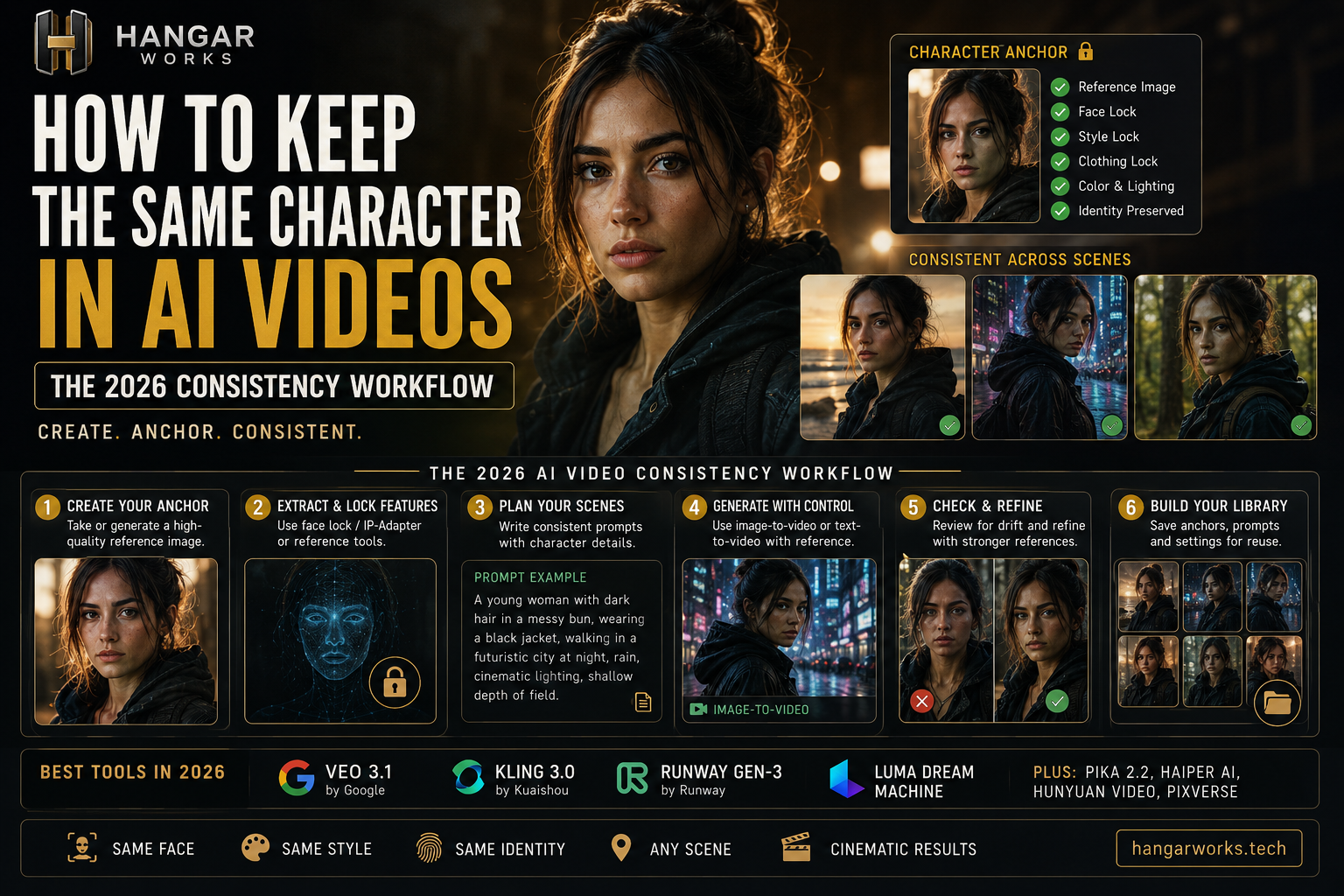
How to Keep the Same Character in AI Videos: The 2026 Consistency Workflow
AI video is dramatically better at motion, cinematography and realism, but one problem still ruins otherwise strong sequences: character drift. A protagonist looks right in shot one, slightly different in shot two, and like another person by shot five.
The most reliable 2026 solution is reference-first: establish a visual anchor, generate controlled stills or reference frames, animate those frames, and keep shots short enough that identity does not have time to collapse.
Why characters drift between AI video shots
A text prompt describes a type of person, not one unique identity. Each fresh generation can reinterpret facial proportions, hairline, eye spacing, wardrobe and apparent age. Modern reference systems improve this by giving the model visual information to preserve.
The practical rule is simple: text controls the scene; references control identity.
Step 1: Build a master character anchor
Before generating video, create one clean master image of the character. Treat it like casting a real actor. A strong anchor has a clearly visible face, sharp focus, simple lighting, minimal obstruction and the exact hairstyle and core wardrobe you want to reuse.
Build a small reference pack
Create a front-facing portrait, three-quarter portrait, side profile and full-body frame. All images must depict the same design. Do not mix generations where the face, age or wardrobe has already drifted.
Step 2: Lock the features that matter
Decide which traits are non-negotiable: face, apparent age, hairstyle, eye color, signature wardrobe, body proportions and visual style. If the reference defines the character, use the prompt mainly for action, environment, framing, lighting and camera behavior.
Step 3: Plan the sequence before generating
Write a shot list first. Keep identity fixed while changing only what each shot requires. This is easier than asking the model to reinvent the entire world every generation.
Step 4: Prefer image-to-video for identity-critical scenes
A powerful workflow is: reference character → generate approved still → animate approved still → edit clips together. The starting frame already contains the correct face, clothing, composition and environment, so the video model has fewer decisions to make than from text alone.
Step 5: Keep motion controlled
Start with slow walks, subtle head turns, natural blinking, small hand gestures, gentle dolly-ins and slow tracking shots. Spins, rapid camera orbits, heavy occlusion and complex multi-person interaction can increase drift.
Prompt pattern
Same referenced character. Medium cinematic shot inside a dim futuristic workshop. She walks slowly toward a workbench and looks down at a glowing device. Subtle natural expression, realistic body motion, soft practical lighting, shallow depth of field, slow dolly-in. Preserve facial identity, hairstyle and wardrobe from the reference.
Step 6: Generate short shots and edit them together
For story-driven content, short shots are easier to control. Create several strong 5–10 second clips rather than demanding an entire sequence from one generation. If shot four fails, regenerate shot four instead of rebuilding everything.
Step 7: Use successful outputs as new anchors
When a generated frame perfectly preserves the character from a new angle, save it. Build a character library with neutral portraits, close-ups, profiles, full-body frames, indoor/outdoor lighting, night scenes, common outfits and expressions.
How many reference images should you use?
There is no universal number because models expose different systems. Give the model clear, compatible visual evidence. Runway says Gen-4 References can maintain consistent characters from a single reference image, while its product materials also describe workflows using 1–3 reference images. Complementary angles are more useful than near-duplicates.
Keep style consistency separate from identity consistency
A stable face is not enough if lens language, lighting and color change randomly. Keep a small style bible covering aspect ratio, lens feel, depth of field, lighting direction, contrast, palette, camera movement and realism level.
Multi-character scenes
Build each identity separately before putting characters together. Start with Character A alone, then B alone, then both side by side, then conversation, and only later physical interaction. Visually distinct hair, clothing and silhouettes can reduce accidental blending.
Common consistency mistakes
Recreating the face from text every time
Detailed prose helps initial design but does not replace a visual anchor.
Using a bad master image
Blur, extreme shadows, sunglasses and hidden facial features give the model less identity information.
Changing too many variables at once
New wardrobe, hairstyle, camera angle, lighting and complex action together are a recipe for drift.
Accepting almost-right generations
Small errors compound. Do not use a drifting frame as the next reference. Return to a clean anchor.
Overloading the prompt
Keep identity in the reference and describe the shot clearly.
Production-ready workflow
- Design the character.
- Approve one master anchor.
- Build front, profile and full-body references.
- Define a style bible.
- Storyboard the sequence.
- Generate approved starting frames.
- Animate with image-to-video where identity matters.
- Keep clips short and motion intentional.
- Reject drift immediately.
- Save successful frames into the character library.
- Edit the final sequence from the strongest clips.
Which AI tools are best for consistent characters?
The market changes quickly, so evaluate tools by the controls they expose: character/reference images, image-to-video, start/end frames, motion control and reuse of successful generations. Runway Gen-4 is explicitly designed around subject and world consistency. Other modern video systems can be useful depending on the shot, so a hybrid workflow is often stronger than forcing a production through one model.
Final takeaway
Do not ask the AI to remember your character. Give it the character again.
Create a clean visual anchor, build a small reference library, generate controlled starting frames and animate those frames in short shots. The result is fewer wasted generations, less facial drift and a sequence that feels like one recurring character instead of a series of lookalikes.
Frequently asked questions
- Why does my AI character look different in every video?
- Text descriptions define a type of person rather than a fixed identity. Use a clean reference image or approved starting frame to anchor the character across generations.
- Is image-to-video better for character consistency?
- For identity-critical shots it often gives more control because the starting frame already contains the approved face, wardrobe and composition.
- How many character reference images should I use?
- Use the clearest compatible references your chosen model supports. Complementary angles can help when multiple viewpoints are needed.
- How long should AI video clips be for consistent characters?
- Short shots are generally easier to control. A practical workflow is several 5–10 second clips assembled in an editor.
Related stories

Best AI Chatbots in 2026: ChatGPT, Claude, Gemini and More Compared
Compare the best AI chatbots in 2026, including ChatGPT, Claude, Gemini, Perplexity and Microsoft Copilot, with strengths, weaknesses and ideal use cases.
9 min read
AI Just Stepped Into the Physical World: Inside Anthropic’s Model Hardware Standard
Anthropic’s Model Hardware Standard lets AI agents operate microscopes, robotic arms and lab equipment. Here’s how MHS could reshape physical AI and science.
8 min read
What Are AI Agents and How Do They Work? A 2026 Guide
AI agents can plan tasks, use tools and act on results. Learn how AI agents work, how they differ from chatbots, where MCP fits and what they can realistically do in 2026.
9 min